
Entu AI
Entu AI is a chat assistant built into the Entu app. Open it with the sparkles button in the toolbar — it is available to signed-in users. The assistant knows your account's current configuration — entity types and their property definitions — so you can ask questions about it and describe changes in plain language instead of clicking through configuration screens.
What It Can Do
- Answer configuration questions — "Which properties does
personhave?", "Which entity types referenceproject?" - Propose configuration changes — create entity types, add or change property definitions, including formula properties
- Propose data changes — create or update data entities
Reviewing and Applying Changes
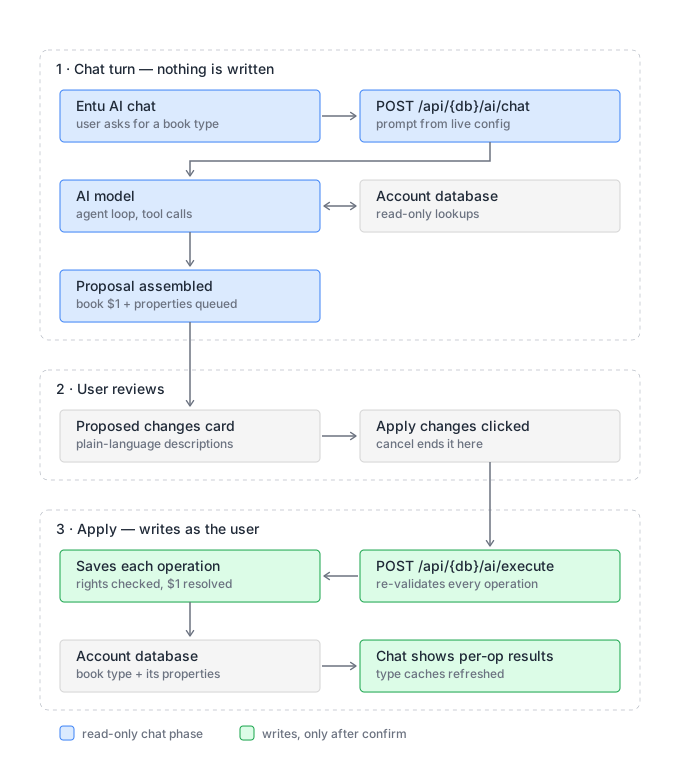
The assistant never applies changes on its own. When it suggests changes, it shows a Proposed changes list where each operation is described in plain language. Review the list, then click Apply changes to execute the operations — or Cancel to discard them. Nothing happens in your database until you click Apply.
Operations are executed in order, and each one gets a status: applied, failed, or skipped. If an operation fails (for example due to insufficient rights), execution stops — operations before it are already applied, and the remaining ones are skipped.
WARNING
Applying is not all-or-nothing. If an operation in the middle of the list fails, the operations before it have already been applied and are not rolled back. Check the per-operation status to see what went through.
The full flow — using "create an entity type for books" as an example:
Permissions
Entu AI runs entirely with your own rights. It can only see what you can see and change what you could change manually — it does not grant any extra access. If you lack rights for a proposed operation, that operation fails on apply.
Privacy
Conversations are not stored on the server. When you close the chat, the conversation is gone.
Example Prompts
- "I need to store library info — books and lendings. Set up the needed entities."
- "Add birthyear property to person"
- "Add invoice total field calculated from invoice rows"
TIP
Integrating with the assistant programmatically? See the AI Assistant API for the underlying endpoints.